
Apex GSP Learn to Use Word 2007 PC
Apex GSP Learn to Use Word 2007 PC
Nunc vehicula quam semper odio varius tincidunt. Vestibulum ante ipsum primis in faucibus orci luctus et ultrices posue.
SKU
5016488115520Vendor
ApexProduct Type
Software: Educational55 in stock
Estimated delivery: 5-7 Days from order date.
Free Shipping & Returns: On orders above $79
Let us know abour your query!
Contact Us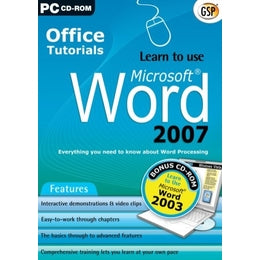
Description
Shipping Information
Reviews
Description
Product Overview
Everything you need to know about Word Processing and Microsoft Word 2007
This comprehensive training program couldn't be easier to use. On-screen video demonstrations take you step-by-step through over 100 different topics, each with clear and concise instructions. Simply pick the topic you want to study and sit back and watch as an expert shows you exactly how it's done. Practise what you've learnt in an interactive tutorial where you try out the task in a simulated environment and then move on to actually 'do it' in your own copy of Word 2007.
Whether you're a complete beginner, or need to refresh your computer skills, this program will have you up and running with Word 2007 in no time at all.
Features
* Interactive demonstrations and video clips
* Easy-to-work-through chapters
* The basics through to advanced features
* Comprehensive training lets you learn at your own pace
* Look at what you’ll be able to learn in just a few minutes!...
STEP 1 – Choose your topic
The program is divided into chapters, which are then broken down into easy-to-master sections which you can study in any order. Simply choose the topic you want to learn more about.
STEP 2 – Study the basics
Read through a short description of the key points to help you follow the on-screen demonstration.
STEP 3 – Watch how the experts do it!
Sit back and watch as the program shows you what to do. The tutor's voice talks you through each step as the screen video plays. You can watch it as many times as you want to make sure you've remembered everything.
STEP 4 – Practise it
Try out what you've learnt in an interactive tutorial that simulates the Word 2007 environment.
STEP 5 – Do it!
Now it's time to actually do it in your own copy of Word 2007. Follow the instructions in the pop-up window while you work through the task yourself.
TOPICS INCLUDE:
Using Word for the first time
* Creating/opening and saving documents
* Print preview and printing
* Selecting, copying, pasting text
* Find and replace text
Getting into good habits
* Keyboard shortcuts
* Automatic save
* Accessing documents
* Click and Type feature
Formatting a document
* Margins, format and orientation
* Character/paragraph formatting
* Tabs, Bullets and Numbering
* Background, borders and shading
Time Saving Tips
* Headers & Footers
* Styles & Templates
* Using themes
* Hyperlinks
Tables
* Creating and formatting a table
* Selections in a table
* Merging/splitting/formatting cells
Pictures
* Inserting a picture
* Changing picture characteristics
* Wrapping text
* Inserting a diagram
Frequently Asked Questions
* Symbols and special characters
* Footnotes / Headers / Page Numbers
* Mail merging / Emailing documents
plus much more...